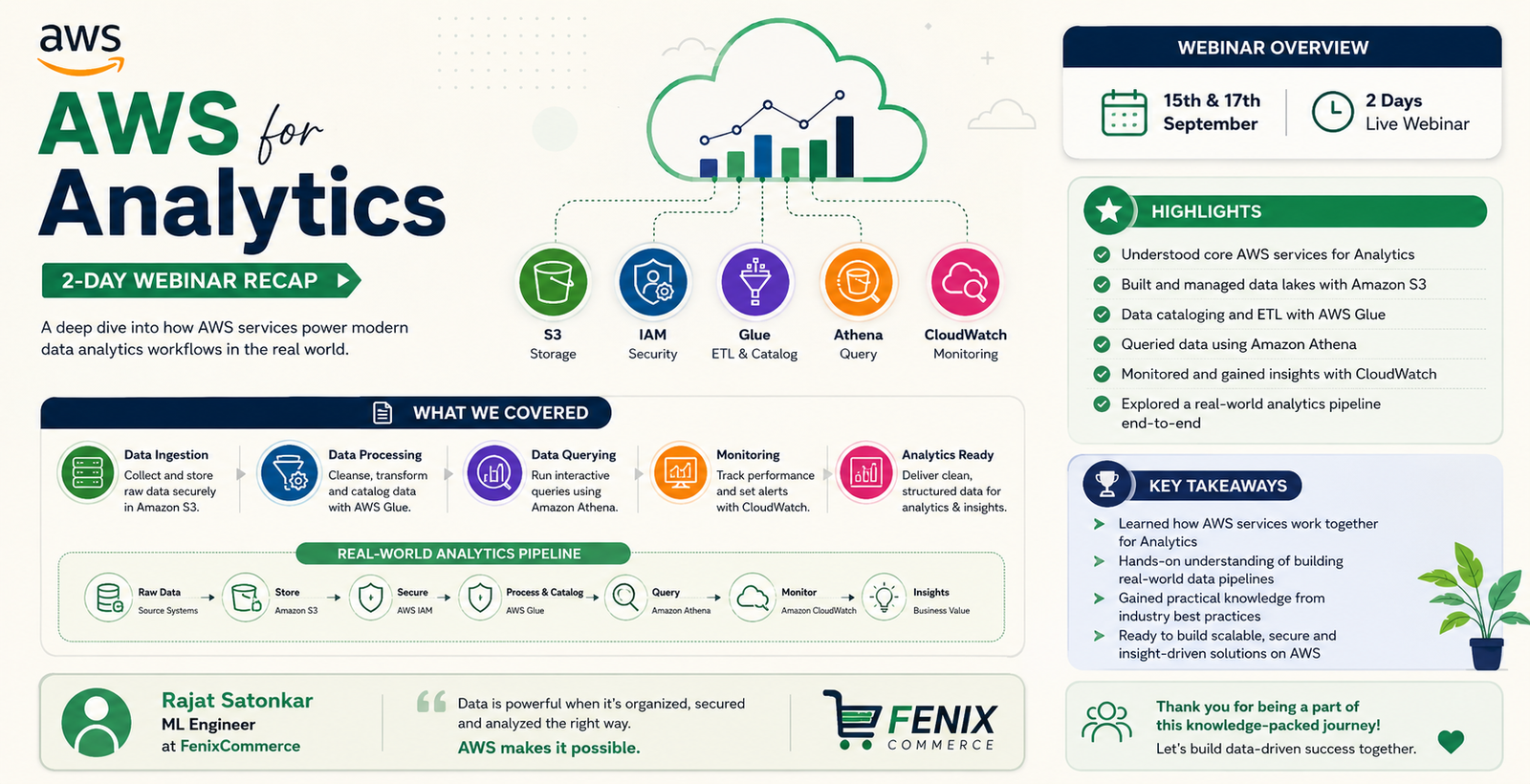
Rajat Satonkar ML Engineer at FenixCommerce
AWS for Analytics: Understanding the Power of Cloud-Based Data Analytics
Data is becoming one of the most important resources for modern businesses. Every day, companies generate a huge amount of data through websites, applications, customer interactions, transactions, and business operations. But collecting data is only the first step. The real challenge is storing, managing, processing, and analysing that data in a useful way.
This is where cloud computing and data analytics come together.
To explore this topic in a practical and easy-to-understand way, a two-day AWS for Analytics webinar was conducted on 15th and 17th September. The webinar focused on how Amazon Web Services (AWS) can be used to build and manage modern data analytics workflows.
The session was led by Rajat Satonkar, ML Engineer at FenixCommerce, who explained the concepts with a focus on real-world applications rather than only theoretical definitions.
Why AWS for Data Analytics?
When we talk about data analytics, we usually think about collecting data, cleaning it, finding useful information, and finally using that information to make better decisions.
However, handling large amounts of data manually can quickly become difficult. Businesses need systems that can store data safely, process it efficiently, provide access to the right people, and help teams monitor their applications and workflows.
AWS provides a collection of cloud services that can help with each of these requirements.
Instead of managing physical servers and infrastructure, organizations can use cloud-based services according to their requirements. This makes it easier to build scalable data solutions while focusing more on the actual business problem.
During the webinar, participants were introduced to some important AWS services commonly used in analytics workflows, including Amazon S3, AWS IAM, AWS Glue, Amazon Athena, and Amazon CloudWatch.
Understanding the AWS Analytics Workflow
One of the key ideas discussed during the webinar was that these AWS services do not work in isolation.
They can work together as different stages of a complete analytics workflow.
A typical data analytics process can start with raw data. This data may come from different sources and may not be ready for analysis. The data first needs to be stored securely. After that, it can be processed and transformed into a more useful format. Once the data is ready, analysts can query it to find useful insights. Finally, the entire environment needs to be monitored to make sure everything is working properly.
This simple workflow helps us understand why different AWS services are required for different tasks.
Amazon S3 – Storing the Data
One of the important services introduced in the webinar was Amazon S3 (Simple Storage Service).
S3 can be used to store large amounts of data in the cloud. In an analytics environment, it can act as a central storage location or data lake where raw data can be collected before further processing.
For example, imagine an e-commerce company receiving thousands of customer transactions every day. Instead of keeping all this information on a local computer, the company can store the data in Amazon S3 and use other AWS services to process and analyse it later.
This makes S3 an important starting point for many cloud-based analytics workflows.
AWS IAM – Managing Access and Security
Storing data is important, but protecting that data is equally important.
This is where AWS Identity and Access Management (IAM) becomes useful. IAM helps organizations control who can access AWS resources and what actions they are allowed to perform.
For example, an organization may want data analysts to read certain datasets while limiting their ability to modify or delete important resources.
By using permissions and roles, IAM helps organizations follow the principle of giving users only the access they actually need.
This becomes especially important when working with business and customer data.
AWS Glue – Preparing Data for Analysis
Raw data is often messy and may not be immediately useful for analytics. It may contain missing values, inconsistent formats, duplicate records, or information that needs to be transformed.
The webinar also introduced AWS Glue, a service that can help with data integration, data cataloging, and ETL processes.
ETL stands for Extract, Transform, and Load.
In simple terms, data can be collected from different sources, transformed into a suitable format, and then prepared for analytics. AWS Glue can help automate parts of this process and make data easier to discover and work with.
This step is important because good analytics depends on good-quality and well-organized data.
Amazon Athena – Querying Data
Once data has been properly stored and prepared, the next step is to analyse it.
Amazon Athena allows users to query data using SQL without needing to manage traditional database infrastructure.
For someone familiar with SQL, this makes it easier to explore datasets and answer business questions.
For example, an analyst might want to know which products generated the highest number of sales, how customer activity changed over time, or which region produced the most revenue.
Instead of manually going through large datasets, SQL queries can be used to retrieve the required information.
Amazon CloudWatch – Monitoring the Environment
The final service discussed in this part of the webinar is Amazon CloudWatch.
Building a data pipeline is not enough. Organizations also need to know whether their applications and AWS resources are working correctly.
CloudWatch provides monitoring and observability capabilities that can help teams track performance, logs, metrics, and alerts.
This allows teams to identify problems and respond to issues more effectively.
From Individual Services to a Complete Solution
The most important takeaway from these concepts is that AWS services become even more useful when they are connected as part of a complete workflow.
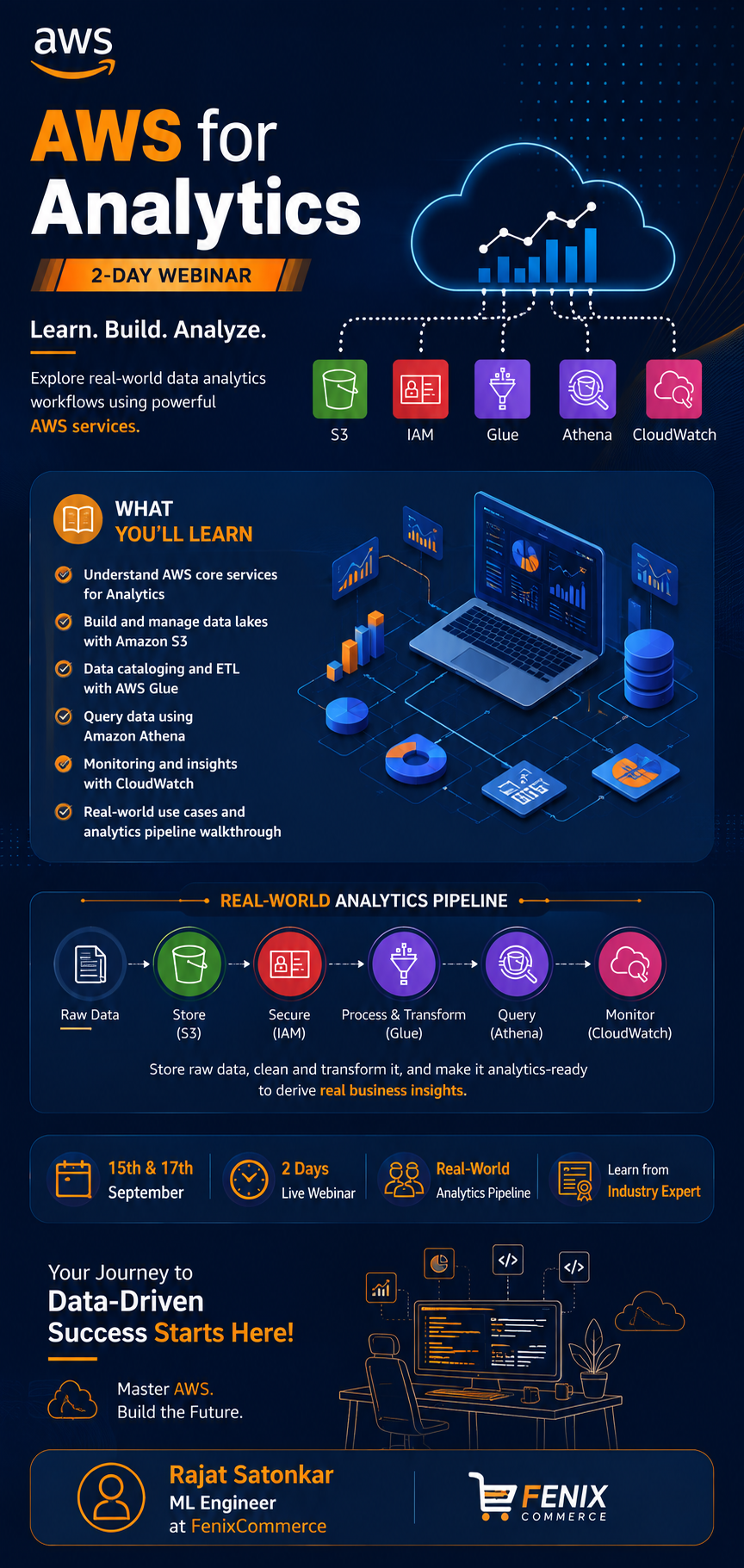
Data can be stored using S3, access can be controlled using IAM, data can be prepared using Glue, the prepared data can be queried using Athena, and the environment can be monitored using CloudWatch.
In the next part, we will move from individual AWS services to the real-world analytics pipeline discussed during the webinar and understand how raw data moves through different stages before becoming useful business insights.
What’s Coming in Part 2?
In the second part, we will explore the practical side of the webinar, including how a real-world analytics pipeline works, how raw data is stored and transformed, how analysts query the final data, and what key learnings participants can take away from the session.
A Real-World Analytics Pipeline with AWS
Understanding individual AWS services is useful, but the real value comes when these services are connected to solve a real business problem.
One of the most interesting parts of the webinar was understanding how a real-world analytics pipeline can be created using AWS. The pipeline shows how raw data moves through different stages before it becomes useful information for business teams.
In a simple analytics workflow, the journey can be understood as:
Raw Data → Storage → Security → Processing → Querying → Monitoring → Insights
Each stage has a specific purpose, and AWS services can work together to support this complete process.
Step 1: Collecting and Storing Raw Data
The first step in any analytics project is getting the data into the system.
Raw data can come from different sources such as applications, websites, customer transactions, databases, or other business systems. At this stage, the data may not be clean or structured.
Amazon S3 can be used as a central storage location for this raw data. Instead of immediately changing the original information, organizations can first store the raw data and then process it according to their requirements.
This approach can be useful when businesses need to work with large and continuously growing datasets.
Step 2: Securing Access to Data
Once the data is stored, controlling access becomes an important requirement.
A data analytics environment may have different users, such as data engineers, data analysts, developers, and administrators. Not everyone needs the same level of access.
AWS IAM can be used to create appropriate permissions and roles for different users and services. This helps organizations manage access and reduce the risk of unauthorized actions.
Security should not be treated as an extra step added at the end of a project. It is an important part of the entire data pipeline.
Step 3: Cleaning and Transforming the Data
Raw data is rarely ready for analysis immediately.
It may contain duplicate records, missing values, different formats, or unnecessary information. Before analysts can use the data, it needs to be processed and organized.
This is where AWS Glue becomes useful.
AWS Glue can support ETL workflows, where data is extracted from its source, transformed into a suitable format, and prepared for further analysis. It can also help with data cataloging, making datasets easier to discover and understand.
The result is a more organized and analytics-ready dataset.
Step 4: Querying the Prepared Data
After the data has been processed, the next question is simple: What can we learn from it?
Amazon Athena can be used to query data stored in services such as Amazon S3 using SQL.
This means analysts can ask business questions directly from the data. For example, an e-commerce company may want to identify its best-selling products, understand customer activity, compare sales across different regions, or analyse changes in revenue over time.
Instead of manually checking large amounts of data, SQL queries can help users quickly find the information they need.
Step 5: Monitoring the Pipeline
A data pipeline needs to work reliably. If a process fails or an application behaves unexpectedly, the team needs to know about it.
Amazon CloudWatch can help monitor AWS resources, applications, logs, metrics, and other operational information.
Monitoring helps teams understand what is happening inside their environment and can make it easier to identify and respond to problems.
This is especially important for analytics systems that support business-critical operations.
Turning Data into Business Insights
The final goal of an analytics pipeline is not simply to store data.
The real goal is to turn data into useful insights.
For example, an organization can use analytics to understand customer behaviour, identify popular products, measure business performance, discover trends, and support better decision-making.
This is why every stage of the pipeline matters. If data is not stored properly, processing becomes difficult. If the data is not cleaned, the analysis may not be reliable. If access is not managed properly, security can become a concern. And without monitoring, problems in the pipeline may go unnoticed.
Key Takeaways from the Webinar
The AWS for Analytics webinar provided a practical understanding of how different AWS services can work together in a modern analytics environment.
Some of the key takeaways from the session include:
- Understanding the role of AWS in modern data analytics.
- Learning how Amazon S3 can be used for cloud-based data storage.
- Understanding the importance of IAM for access control and security.
- Learning how AWS Glue can help with data processing, ETL, and cataloging.
- Understanding how Amazon Athena can be used to query data using SQL.
- Learning why monitoring is important for reliable analytics workflows.
- Understanding how multiple AWS services can work together as a complete analytics pipeline.
Why Practical Learning Matters
One of the important aspects of the webinar was its focus on connecting technical concepts with real-world use cases.
For students and professionals who are starting their journey in cloud computing, data analytics, or machine learning, understanding how different technologies work together can be more valuable than learning each service separately.
A practical workflow makes it easier to understand where a particular service fits and why it is required.
The session also showed that data analytics is not about a single tool. It is a complete process that involves storage, security, processing, querying, monitoring, and decision-making.
Final Thoughts
The AWS for Analytics webinar offered a clear introduction to how cloud services can be used to build modern data analytics workflows.
From storing raw data in Amazon S3 to managing permissions with IAM, processing data with AWS Glue, querying datasets through Amazon Athena, and monitoring the environment with CloudWatch, each service plays an important role in the overall pipeline.
The biggest takeaway is simple: data becomes more valuable when it is properly organized, secured, processed, and analysed.
As businesses continue to generate more data, cloud-based analytics skills are becoming increasingly important. Learning platforms such as AWS can help students, developers, data analysts, and technology professionals understand how modern data systems are designed and used in the real world.
The webinar, led by Rajat Satonkar, ML Engineer at FenixCommerce, provided participants with a practical view of these concepts and showed how AWS services can come together to create an end-to-end analytics solution.
From raw data to meaningful insights, AWS provides the building blocks needed to create scalable and effective analytics workflows.
Conclusion
Data analytics and cloud computing are closely connected, and AWS provides a wide range of services to support this connection.
By understanding how services such as S3, IAM, Glue, Athena, and CloudWatch work together, learners can build a strong foundation for working with cloud-based data analytics.
The journey does not end with learning the services. The next step is applying these concepts to real-world datasets, building pipelines, writing queries, and using the results to solve actual business problems.
That is where the real power of AWS for Analytics begins.